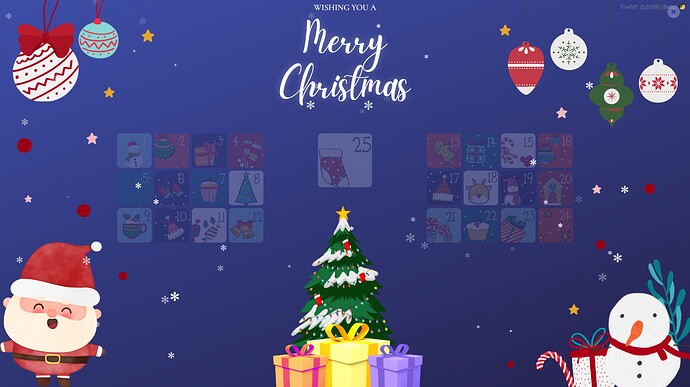
> For the complete documentation index, see [llms.txt](https://rex-studio.gitbook.io/rex-studio-docs/llms.txt). Markdown versions of documentation pages are available by appending `.md` to page URLs; this page is available as [Markdown](https://rex-studio.gitbook.io/rex-studio-docs/fivem-low-cost/advent-calendar.md).
# ADVENT CALENDAR
## 📅 Advent Calendar - AdvCalendar
### 📋 Description
**AdvCalendar** is a FiveM script that allows players to collect daily rewards during the Christmas period. The script displays an interactive advent calendar with a modern user interface and festive visual effects.
### ✨ Features
* 🎁 **Daily reward system** : Players can open one box per day
* 🎄 **Festive user interface** : Modern design with snow effects and animations
* 👤 **Interactive NPC** : A Christmas vendor appears at a configurable location
* 💾 **Database saving** : Tracks rewards collected per player
* 🔄 **Multi-framework support** : Compatible with ESX and QBCore
* 🎁 **Various reward types** : Items, cash, weapons
* 🌍 **Translation system** : Customizable messages
### 📦 Prerequisites
* **Framework** : ESX Legacy or QBCore
* **Database** : MySQL (mysql-async)
* **FiveM Version** : Recommended (fx\_version cerulean)
* **Lua 5.4** : Enabled
### 🚀 Installation
#### 1. Download
Download the script and place it in your `resources` folder.
#### 2. Database
Execute the provided SQL file in your database :
```sql
CREATE TABLE IF NOT EXISTS `advcalendar` (
`id` int NOT NULL AUTO_INCREMENT,
`identifier` varchar(255) DEFAULT NULL,
`date` int DEFAULT NULL,
PRIMARY KEY (`id`)
) ENGINE=InnoDB DEFAULT CHARSET=utf8mb3;
```
#### 3. Configuration
Add the script to your `server.cfg` :
```cfg
ensure advcalendar
```
#### 4. Dependencies
Make sure the following dependencies are loaded before the script :
* `mysql-async`
* Your framework (ESX or QBCore)
### ⚙️ Configuration
All settings are configurable in the `shared/config.lua` file.
#### Framework
```lua
Chrismas.framework = "esx" -- "esx" or "qb" for QBCore
```
#### NPC Location
```lua
Chrismas.Coords = vec4(244.509888, -871.727478, 30.290894, 2.834646)
-- Format : vec4(x, y, z, heading)
```
#### NPC Model
```lua
Chrismas.Vendor = "mp_m_freemode_01"
-- Note : Use an "mp_" model to keep Christmas clothing
```
#### Translations
Customize all messages in `Chrismas.Translate` :
```lua
Chrismas.Translate = {
Open = "Press ~o~E~w~ to open ~o~Advent Calendar",
Receive = "You have received",
Wishes = "WISHING YOU A",
MerryChristmas = "Merry Christmas",
AlerteMessage = "Recover your previous rewards",
AlreadyRetrieved = "You have already retrieved your reward",
OpenReward = "You have opened your reward"
}
```
#### Rewards
Configure rewards for each day (0-25) in `Chrismas.Item` :
```lua
Chrismas.Item = {
[0] = {}, -- Day 0 (no reward)
[1] = {object="item", label="Bread", name="bread", count=3},
[2] = {object="cash", label="Cash", name="", count=15000},
[3] = {object="weapon", label="Pistol", name="WEAPON_PISTOL", count=1},
-- ... up to day 25
}
```
**Available reward types :**
* `item` : Inventory item
* `cash` : Cash money
* `weapon` : Weapon
**Parameters :**
* `object` : Reward type ("item", "cash", "weapon")
* `label` : Display name of the reward
* `name` : Item/weapon name (empty for cash)
* `count` : Quantity
#### Logs
Enable or disable database logs :
```lua
Chrismas.Log = true -- true to enable logs
```
### 🎮 Usage
#### For players
1. Go to the configured advent calendar location
2. Approach the NPC (Christmas vendor)
3. Press **E** to open the calendar
4. Click on the corresponding day's box to collect your reward
5. You can only open one box per day
#### Progression system
* Players can only open the current day's box
* If a player has already collected their reward for the day, they cannot collect it again
* The system automatically tracks each player's progression
### 📁 File Structure
```
advcalendar/
├── client/
│ ├── client.lua # Main client script
│ └── function.lua # Utility functions
├── server/
│ └── server.lua # Main server script
├── shared/
│ └── config.lua # Shared configuration
├── ui/
│ ├── index.html # User interface
│ ├── css/ # CSS styles
│ ├── js/ # JavaScript scripts
│ ├── images/ # Images and textures
│ ├── fonts/ # Custom fonts
│ └── sound/ # Sounds and music
├── fxmanifest.lua # FiveM manifest
└── create-advcalendar.sql # SQL table creation script
```
### 🔧 Framework Support
#### ESX
The script uses standard ESX exports :
* `ESX.GetPlayerFromId()`
* `xPlayer.addMoney()`
* `xPlayer.addInventoryItem()`
* `xPlayer.addWeapon()`
#### QBCore
The script uses standard QBCore exports :
* `QBCore.Functions.GetPlayer()`
* `xPlayer.Functions.AddMoney()`
* `xPlayer.Functions.AddItem()`
### 🐛 Troubleshooting
#### NPC doesn't appear
* Check that coordinates in `config.lua` are correct
* Make sure the NPC model is valid
* Check server logs for any errors
#### Rewards are not given
* Verify that the database is properly configured
* Make sure item/weapon names are correct
* Check server logs for MySQL errors
#### Interface doesn't open
* Verify that all UI files are present
* Make sure `ui_page` is properly configured in `fxmanifest.lua`
* Check F8 console for JavaScript errors
### 📝 Important Notes
* ⚠️ The NPC must use an "mp\_" model to keep Christmas clothing
* ⚠️ Players can only open one box per day
* ⚠️ The system automatically checks if a reward has already been collected
* ⚠️ Make sure mysql-async is loaded before this script
***
**Merry Christmas ! 🎄🎁**