> For the complete documentation index, see [llms.txt](https://rex-studio.gitbook.io/rex-studio-docs/llms.txt). Markdown versions of documentation pages are available by appending `.md` to page URLs; this page is available as [Markdown](https://rex-studio.gitbook.io/rex-studio-docs/fivem-low-cost/pause-menu-with-report.md).
# PAUSE MENU with REPORT
A modern and customizable pause menu for FiveM, compatible with **QB-Core** and **ESX Framework**.
***
### 📖 Description
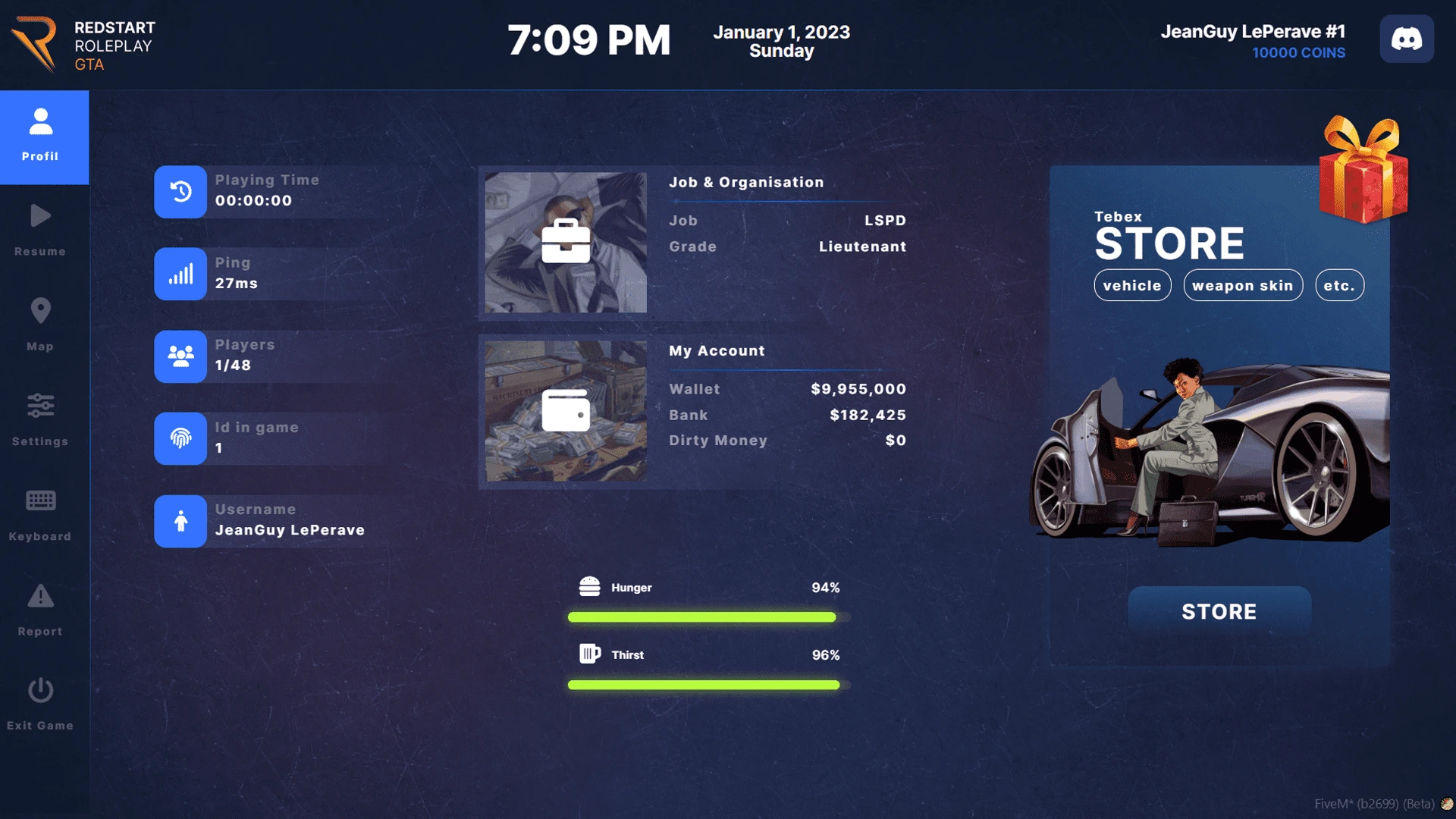
**REX STUDIO - Pause Menu** is a complete pause menu system that replaces the default GTA V menu. It offers a modern interface with many integrated features to enhance your players' gaming experience.
#### ✨ Main Features
* 🎨 **Modern Interface** : Clean and professional design
* 👤 **Player Profile** : Display complete player information
* 💰 **Money System** : Display cash, bank, and dirty money
* 📊 **Statistics** : Play time, ping, player count
* 🍔 **Status** : Display hunger and thirst
* 📝 **Report System** : Integrated report system for players and staff
* 🛒 **Tebex Integration** : Support for your Tebex store
* 🪙 **Coin System** : Display custom coins/items
* 🌍 **Multi-language** : Support for multiple languages via configuration
* ⚙️ **Customizable** : Full configuration via config file
***
### 📦 Prerequisites
Before installing this script, make sure you have:
* ✅ A working FiveM server
* ✅ **ESX Framework** (1.8.5+) or **QB-Core**
* ✅ **esx\_status** (for ESX only - to display hunger/thirst)
* ✅ **screenshot-basic** (optional - for report screenshots)
***
### 🚀 Installation
#### Step 1: Download
1. Download the script from your source
2. Extract the archive into your `resources` folder
#### Step 2: Configuration
1. Rename the folder to `pausemenu2` (or your preferred name)
2. Open the `shared/config.lua` file to configure the script
#### Step 3: Add to Server
1. Add the resource to your `server.cfg`:
```lua
ensure pausemenu2
```
2. Restart your server or type `/refresh` then `/ensure pausemenu2`
***
### ⚙️ Configuration
#### General Configuration
All settings are configurable in `shared/config.lua`:
**ESX Configuration**
```lua
Config.OldESX = false -- true for ESX Legacy (< 1.8.5)
Config.OldESXName = "esx:getSharedObject" -- ESX event name
```
**Main Options**
```lua
Config.Key = 'ESCAPE' -- Key to open the menu
Config.Name = 'REX STUDIO - Pause Menu' -- KeyMapping name
Config.Discord = 'https://discord.gg/your-server' -- Discord link
Config.Quit = "Thanks for playing on our server!" -- Disconnect message
Config.MaxPlayers = "512" -- Maximum number of slots
Config.PingAdress = "https://www.google.com" -- Address for ping
```
**Money Configuration**
```lua
Config.BlackMoney = "black_money" -- Dirty money account name
Config.BankMoney = "bank" -- Bank account name
```
**Currency and Format**
```lua
Config.Currency = "USD" -- EUR, GBP, USD...
Config.Format = "en-US" -- fr-FR, en-GB, es-ES...
```
**Tebex Store**
```lua
Config.TebexStore = true -- true to display Tebex, false to display 2 custom blocks
Config.Boutique = 'https://your-store.tebex.io' -- URL of your Tebex store
```
**Coin System**
```lua
Config.UseCoin = true -- true to enable coins
Config.CoinName = "water" -- Coin item name in your database
Config.CoinDisplay = "COINS" -- Display name in menu
```
#### Translations
Modify the `Config.Translate` section to translate all menu texts:
```lua
Config.Translate = {
Profil = "Profile",
Resume = "Resume",
Map = "Map",
Settings = "Settings",
-- ... etc
}
```
#### Report System Configuration
```lua
Config.ReportSoundAdmin = true -- Notification sound for admins
Config.ReportListCommand = "reportadmin" -- Command to view reports (staff)
Config.ServerName = 'My Server - Logs Report' -- Server name
Config.IconURL = 'https://your-logo.png' -- URL of your logo
Config.Webhook = "" -- Discord webhook for reports (optional)
Config.TakeScreenshot = "" -- Discord webhook for screenshots (optional)
```
#### Custom Notifications
```lua
Config.Notifications = {
useCustom = false, -- true to use your own notifications
customNotificationClient = function(message)
-- Your client notification function
ESX.ShowNotification(message)
end,
customNotificationServer = function(source, message)
-- Your server notification function
TriggerClientEvent("esx:showNotification", source, message)
end,
}
```
***
### 🎮 Usage
#### For Players
* **Open Menu** : Press `ESC` (or configured key)
* **Create Report** : Click on "Report" in the menu
* **View Information** : All information is displayed automatically
#### For Staff
* **View Reports** : Type `/reportadmin` in chat
* **Manage Reports** : Use the report management interface
* **Teleport to Player** : Click on "GO TO PLAYER" in a report
* **Mark as Solved** : Click on "SOLVED" to mark a report as resolved
***
### 📡 Exports
The script exposes several exports that you can use in other scripts:
#### Client
```lua
-- Open report form
exports['pausemenu2']:Report()
-- Open report list (staff only)
exports['pausemenu2']:ReportList()
```
#### Usage Example
```lua
-- In another client script
RegisterCommand('myreport', function()
exports['pausemenu2']:Report()
end)
```
***
### 🔧 QB-Core Support
> **Note** : The script is currently configured for ESX only. For QB-Core support, you will need to modify the following files:
#### Required Modifications
1. **client/client.lua** : Replace ESX calls with QB-Core
2. **server/server.lua** : Adapt callbacks for QB-Core
3. **shared/server.lua** : Modify the `IsAdmin` function for QB-Core
4. **shared/config.lua** : Add an option to choose the framework
#### ESX → QB-Core Conversion Example
**ESX** :
```lua
local xPlayer = ESX.GetPlayerFromId(src)
local money = xPlayer.getMoney()
```
**QB-Core** :
```lua
local Player = QBCore.Functions.GetPlayer(src)
local money = Player.PlayerData.money.cash
```
***
### 🐛 Troubleshooting
#### Menu Won't Open
* Check that the resource is started: `/ensure pausemenu2`
* Check that the configured key matches `Config.Key`
* Check F8 console for errors
#### Information Not Displaying
* Check that ESX/QB-Core is properly installed
* Check the configuration in `shared/config.lua`
* Check that account names (`Config.BlackMoney`, `Config.BankMoney`) are correct
#### Report System Not Working
* Check that you are staff (`IsAdmin` function)
* Check the `/reportadmin` command in `Config.ReportListCommand`
* Check server logs for errors
#### Status (Hunger/Thirst) Not Displaying
* Make sure **esx\_status** is installed and started
* Check that `esx_status:getStatus` events work correctly
***
### 📝 File Structure
```
pausemenu2/
├── client/
│ ├── add.lua # Custom actions
│ ├── client.lua # Main client script
│ ├── function.lua # Utility functions
│ └── report.lua # Report system client
├── server/
│ ├── report.lua # Report system server
│ └── server.lua # Main server script
├── shared/
│ ├── client.lua # Shared client functions
│ ├── config.lua # Main configuration
│ └── server.lua # Shared server functions
├── ui/
│ ├── css/ # CSS files
│ ├── js/ # JavaScript files
│ ├── images/ # Images and logos
│ ├── sound/ # Sounds
│ └── index.html # HTML interface
└── fxmanifest.lua # FiveM manifest
```
***
### 🎨 Customization
#### Modify Design
* **CSS** : Edit files in `ui/css/`
* **Images** : Replace images in `ui/images/`
* **Logo** : Replace `ui/images/logo.png` with your logo
#### Add Features
* **Custom Blocks** : Edit `client/add.lua` to add custom actions
* **New Pages** : Add HTML in `ui/index.html` and JavaScript in `ui/js/`
***
### 📞 Support
For any questions or issues:
* 📧 **Email** :
* 💬 **Discord** : [Join our Discord](https://discord.gg/your-server)
* 🌐 **Website** :
***
### 📄 License
This script is the property of **REX STUDIO**. Any unauthorized redistribution, modification, or sale is strictly prohibited.
***
### 👏 Credits
**Developed by REX STUDIO**
* 🎨 Design and Development : REX STUDIO
* 🖼️ UI/UX : REX STUDIO
* 💻 Code : REX STUDIO
***
### 📌 Changelog
#### Version 1.2
* ✅ Added integrated report system
* ✅ Screenshot support for reports
* ✅ UI improvements
* ✅ Discord webhook support
* ✅ Performance optimizations
***
### ⚠️ Warnings
* ⚠️ This script requires a valid FiveM server
* ⚠️ Make sure you have prerequisites installed before installation
* ⚠️ Always backup your server before any modifications
* ⚠️ Always test on a test server before production
***
**Thank you for choosing REX STUDIO!** 🚀